
The 2026 Guide to Securing PowerBuilder Applications
Strengthen Security, Reduce Risks, and Demonstrate Compliance
A comprehensive guide for development teams, security officers, and compliance managers working with PowerBuilder applications.
1. Introduction
Who is this guide for
Teams in charge of PowerBuilder applications: developers, architects, project managers, and operations managers. It explains how to strengthen application security and secure their lifecycle (dev/testing/production).
Security and compliance teams: application security managers, CISOs, GRC teams, internal or external auditors. It helps assess the security level of a PowerBuilder application and prepare for an audit or compliance review.
Why read this guide
PowerBuilder applications are at the heart of critical processes (finance, healthcare, logistics, industry, public sector). They must now meet higher security and compliance requirements than when they were designed.
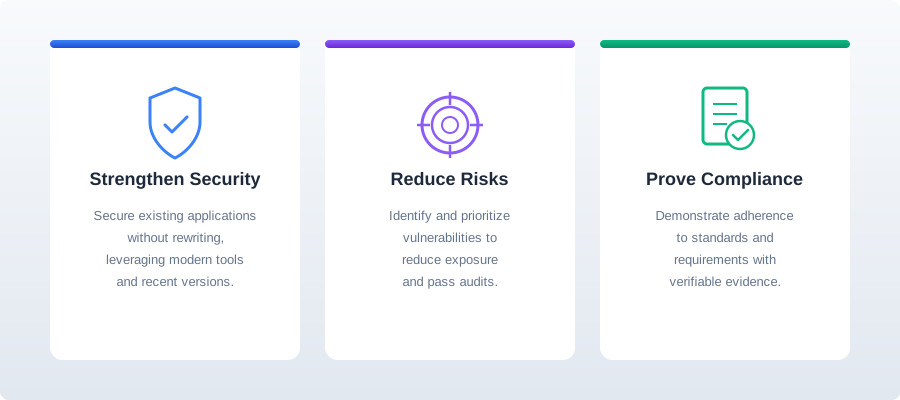
In this context, organizations must simultaneously meet three objectives:
- Enhance security without rewriting the application, using recent versions of PowerBuilder and specialized tools.
- Identify, prioritize, and correct key risks to reduce exposure to vulnerabilities and pass audits.
- Demonstrate compliance with standards and requirements (ISO, NIST, PCI, HIPAA, SOX, GDPR) by providing verifiable evidence.
What you will gain
By reading this guide, you will have:
- An action plan to strengthen the security of your PowerBuilder applications, from executable integrity to access control and auditing.
- A compliance roadmap linking these technical measures to the expectations of standards and regulations.
This guide is modular and can be read selectively.
Each chapter is independent and structured for quick reading: contexts, threats, technical objectives, features of each tool, compliance with key standards, evidence.
It can serve as a basis for a security or compliance project.
Developers & architects
Strengthen application security and secure its lifecycle — without a full rewrite.
CISOs & security managers
Assess the security posture of a PowerBuilder application and drive the remediation plan.
GRC teams & auditors
Prepare an audit or compliance review and build the supporting evidence package.
2. Securing Executables and Deployed Components
Context and risks: PowerBuilder applications are often deployed via internal distribution mechanisms (network shares, packages, general-purpose deployment tools) and based on implicit trust in the delivered executable.
With the hardening of workstations, an unsigned or untraceable executable is often blocked, while a compromised binary may be accepted if controls are weak.
This risk goes beyond ease of deployment: it corresponds to a scenario of compromise of the software chain, as illustrated by the 3CX incident in 2023: a legitimate application was infected and distributed on a large scale, paving the way for multiple intrusions before detection.
Furthermore, attackers seek to take advantage of the trust placed in signed elements: Sophos has documented 133 malicious Windows drivers, 100 of which were signed through the WHCP program.
The solution is to establish a verifiable chain of trust: analyze before publication, systematically sign artifacts, track deployed versions, and limit publication rights.
Beyond code signing, many organizations now expect executable-level hardening and tighter control over DLL loading on client workstations. This reduces the risk of memory-exploitation techniques and DLL hijacking on sensitive endpoints.

Objectives
- Implement a reproducible and versioned compilation process associated with a version of the application.
- Systematically sign executables, libraries, and deployment packages with a certificate approved by the organization.
- Verify the integrity of artifacts (e.g., via a hash) before distribution.
- Track deployed versions, their hashes, release dates, and responsible parties.
- Restrict and audit publication and administration rights related to deployment and security.
- Enable supported executable hardening flags for the application executable when the target build mode allows it.
- Restrict DLL loading to approved paths and enable DLL signature verification where applicable.
Features and Tools
| Integrate code signing into the compilation and deployment process, including for PowerServer and PowerClient projects. | PB |
| Use extended validation certificates (EV certificates) to sign applications, improving user confidence and compatibility with modern security policies. | PB |
| Enable advanced executable security flags for the application executable, such as DEP, ASLR, CFG, and SafeSEH (32-bit only), when supported by the project type. | PB |
| Restrict DLL loading paths and enable DLL signature verification to reduce DLL hijacking risks on client workstations. | PB |
| Secure deliveries by analyzing PowerBuilder code and detecting vulnerabilities and bad practices using security rules (SAST) dedicated to PowerBuilder. | VE |
| Detect hard-coded identifiers/passwords, encryption keys, and IP addresses in the code to reduce the risk of leaks through decompilation or copying of deployment scripts. | VE |
Compliance
This chapter typically addresses expectations related to software integrity and release cycle control, often found in standards such as ISO 27001 and in SOX-compliant environments. Security Standards & Compliance
Evidence
- Signing procedure (certificate, timestamp, responsibilities) and proof of execution in the pipeline.
- Build evidence showing enabled executable security flags and approved DLL loading security settings.
- Verification results produced with tools such as PESecurity, dumpbin, or WinDbg after build.
- Visual Expert report associated with the signed version (vulnerabilities, severity, corrections).
- Visual Guard audit history on sensitive operations (administration, changes in authorizations).
Note about PB 2025 R2: Advanced executable security flags are currently a beta feature and apply only to the application executable. Runtime files are planned for a future major release.
3. Encrypt Data at Rest and in Transit
Loss of system and data availability is a common problem: ransomware is present in 44% of confirmed breaches (Verizon 2025 DBIR).
But these attacks may be accompanied by prior exfiltration of information ("double extortion"), turning the incident into a data leak and a compliance crisis (CISA – Ransomware Guide).
In the healthcare sector, the MD Anderson case resulted in major regulatory sanctions due to unencrypted storage (workstations, laptops, removable media).
The solution is to make data unreadable outside of its context: encryption at rest, encryption in transit, rigorous key management, and limitation of associated privileges.

Objectives
- Identify sensitive data handled by the application and its locations (database, files, exports, logs, backups).
- Encrypt secrets and sensitive parameters to prevent them from appearing in plain text in code, scripts, and configuration files.
- Encrypt communications between the client workstation, application servers, and database, applying the encryption modes recommended by the company.
- Secure local storage and sensitive exports when the client workstation may contain critical data.
- Verify that the algorithms, key sizes, and cryptographic parameters used are compliant and maintained.
Features and Tools
| Encrypt the connection properties of transaction objects and generate an encrypted connection string using the Secure Connection Encryptor to avoid clear-text credentials in scripts or files. | PB |
| Encrypt SQL Server connections by enabling TLS/'Strict' encryption in the SQL Server driver and on the database side, and validate certificates. | PB |
| Encode and encrypt data with the CoderObject and CrypterObject objects. | PB |
| Scan PowerBuilder code to detect uses of DES/3DES, obsolete hash functions (SHA-1/MD5, etc.), encryption modes, hard-coded keys or non-robust key sizes. | VE |
| Reduce exposure by precisely controlling access to sensitive data and functions via a permissions/roles model. | VG |
| Log access to sensitive data and critical operations. Enable detailed auditing (who did what, when, and from where). Traceability & Audit | VG |
Compliance
This chapter contributes to the confidentiality and data protection requirements in ISO 27001, NIST SP 800-53, PCI DSS and, depending on the context, HIPAA and GDPR. Security Standards & Compliance
Evidence
- Connection encryption configuration (DB profiles, application settings) and secret rotation procedures.
- Visual Expert report demonstrating the absence of hard-coded secrets and the reduction of cryptography-related risks.
- Exports of permission matrix and Visual Guard audit histories for sensitive areas.
4. Adopt Modern and Secure Network Protocols
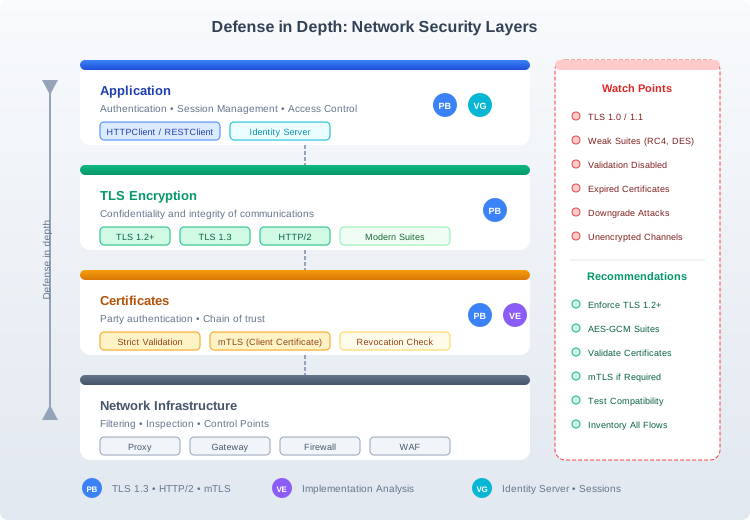
Risks arise when using outdated protocols, weak cryptographic suites, or unencrypted channels: interception or manipulation of traffic (authentication, data, tokens), or blocking of an application if a proxy, server, or database requires TLS 1.2+ or strict mode. The security incident then becomes a production problem.
The NIST SP 800-52r2 publication therefore recommends TLS 1.2 as a minimum and sets configuration requirements to reduce downgrade attacks and encryption errors.
In terms of compliance, PCI DSS requires the use of strong cryptography to protect payment data when transmitted over open networks.
The solution is to inventory traffic flows, tighten TLS settings, and standardize network components.
Objectives
- Inventory the network flows used by the application and the protocols actually negotiated (TLS versions, cryptographic suites, certificates).
- Eliminate obsolete protocols and enforce TLS versions and configurations that are aligned with the organization's security policy.
- Implement mutual authentication (client certificate) when the environment requires it, particularly for internal APIs or partners.
- Standardize certificate validation and error handling to prevent bypasses and silent degradations.
- Test compatibility with proxies, gateways, and network protections to prevent security controls from blocking production.
Features and Tools
| Support TLS 1.3 and HTTP/2 with HTTPClient and RESTClient objects. | PB |
| Support mutual TLS authentication (client certificate), for example for internal APIs or partner services. | PB |
| Identify code communication points (HTTP clients, web service calls, certificate management). | VE |
| Detect uses that do not support modern security protocols (e.g., calls to SOAP/INET services or use of unsecured authentication APIs). Prioritize network refactorings. | VE |
| Use standardized web services for authentication, access control, and logging via a dedicated server to centralize controls and limit client-side security logic. | VG |
Compliance
This chapter contributes to the controls related to communications security in ISO 27001 and NIST, and frequently meets audit requirements in the finance and healthcare sectors. Security Standards & Compliance
Evidence
- TLS settings (versions, suites, certificates, mTLS if applicable) and connectivity test results.
- List of application endpoints and justification of protocols used.
- Proof of integration of centralized authentication (Identity Server) for exposed flows. How to use Identity Server API?
5. Secure Exchanges with External Services and APIs
This openness speeds up projects, but it also creates entry points: incomplete access controls, overly permissive tokens, insufficient input validation, or secrets shared between environments. An application calling APIs with a token stored locally or shared between environments (dev/test/prod) can open the door to an attack in the event of a workstation compromise or configuration leak.
OWASP points out that the most critical weakness on the API side remains the lack of object-level access controls.
In terms of business processes, the FBI IC3 2024 report estimates losses related to compromised business emails at $2.77 billion (wire transfer fraud, invoice hijacking, etc.).
The Optus incident (2022), which affected approximately 10 million customers, illustrates the extent of exposure when customer data becomes accessible via the Internet.
The response is to standardize authentication, limit privileges and the exposed surface area, and control exchanges.

Objectives
- Identify integrations (APIs, internal services, SMTP) and the data exchanged.
- Implement standard authentication between systems (e.g., OAuth).
- Strictly limit privileges associated with tokens and technical accounts.
- Remove hard-coded secrets and organize their storage, rotation, and revocation.
- Avoid exposing sensitive information in messages and logs.
- Control and track high-impact operations (exports, transmissions, critical actions).
- Implement mechanisms for detecting abuse.
Features and Tools
| Prefer REST-based integrations using RESTClient. If SOAP is required, use HTTPClient with TLS 1.2+ with strong authentication, and avoid legacy SOAP client implementations. | PB |
| Use the OAuth 2.0 authorization protocol to align with common API integration practices. Enhanced RESTClient object | PB |
Use token-based authentication (OAuth 2.0 bearer tokens) rather than transmitting usernames and passwords, and manage tokens with HTTPClient and OAuthClient. ( HTTPClient and OAuthClient enhancements - What's New ) |
PB |
| Natively support SMTP and use modern authentication methods (including XOAUTH2). Reduce potentially fragile in-house implementations. Native email support (SMTP Client) | PB |
| Scan code to identify possible attacks by code injection in SQLs, OS commands or Path, hard-coded secrets, insufficient error handling, or lack of controls on exchanged data. | VE |
| Limit who can trigger sensitive calls (export, sending, business actions). | VG |
| Track these operations for audits and investigations. Monitor in real time and trigger notifications in the event of critical or unusual events. | VG |
Compliance
Integrations controls contribute to the security and traceability requirements of ISO 27001, NIST, PCI DSS, and, depending on the scope, HIPAA. Security Standards & Compliance
Evidence
- Inventory of integrations (API, SMTP, internal services) and authentication method used (OAuth, certificates, etc.) Enhanced RESTClient object - What's New - Native email support (SMTP Client) - What's New
- Visual Expert report certifying the absence of hard-coded secrets and that the main risks have been corrected. Detect security vulnerabilities in PowerBuilder code
- Visual Guard logs showing the execution of sensitive operations and any alerts. Traceability & Audit
6. Reduce the Attack Surface Related to the Embedded Browser
These integrations are sometimes based on legacy components. Microsoft ended support for IE11 in June 2022. It now recommends using Edge in IE mode. Keeping old web controls creates a risk of vulnerabilities and the execution of unwanted content.
Microsoft documentation also notes that the WebBrowser control runs in 'full trust' mode and does not prevent the execution of potentially dangerous scripts or content originating from external servers.
Vulnerabilities in the MSHTML engine have already been exploited in targeted attacks, such as CVE-2021-40444, which triggered a CISA alert.
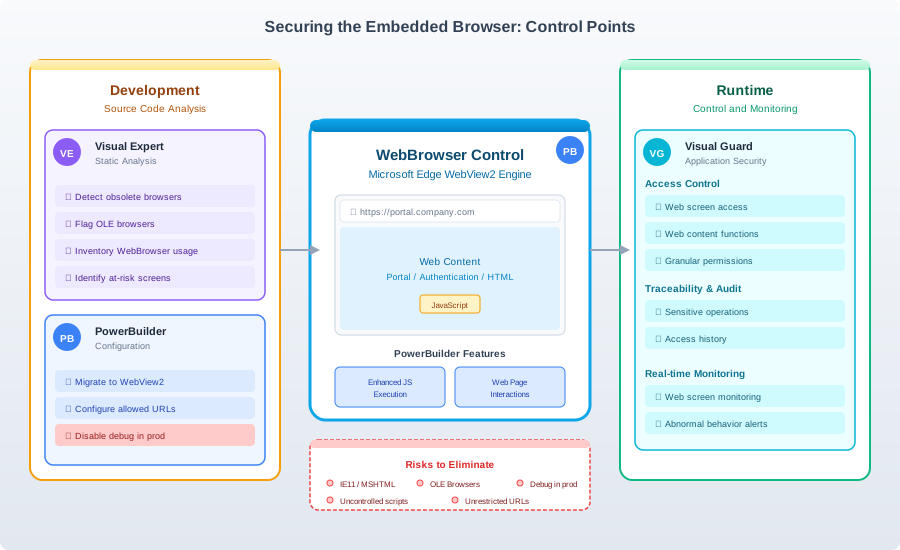
In this context, it is recommended to limit the web content accessed, isolate the component, and migrate to a modern, supported engine.
Objectives
- List the screens using a browser, the expected content, and the authorized URLs.
- Migrate to a modern browser and remove unsupported components.
- Strictly limit browsing, URL opening, and script execution, especially for content from external servers.
- Supervise exchanges between the application and web pages (JavaScript interactions) to prevent unwanted execution or access.
- Disable remote debugging in production.
Features and Tools
| Use the modernized WebBrowser control based on Microsoft Edge WebView2, with associated functional enhancements. | PB |
| Leverage WebBrowser improvements for JavaScript execution and page interaction. | PB |
| Enable remote debugging of WebBrowser for diagnostic purposes. This feature must be strictly controlled and disabled in production. | PB |
| Detect the use of an OLE browser or obsolete components, as they are more exposed to vulnerabilities and security incompatibilities. | VE |
| Inventory and analyze WebBrowser usage (URL opening, script execution, content manipulation) to identify at-risk screens and prioritize fixes. | VE |
| Restrict access to screens or functions that integrate web content. | VG |
| Track and audit sensitive operations associated with the browser. | VG |
| Monitor access to screens and functions displaying web content in real time and notify teams in the event of abnormal behavior. | VG |
Compliance
This chapter supports requirements related to attack surface reduction and access control, typically found in ISO 27001 and NIST. Security Standards & Compliance
Evidence
- List of screens containing a WebBrowser, with hardening measures applied (authorized URLs, remote debugging disabled in production).
- Visual Expert report on identified web entry points and corrections made.
- Visual Guard evidence of access control and auditing on these screens/functions. Traceability & Audit
7. Secure the Build and Deployment Chain
Context and risks: The security of an application is not limited to its source code: it also depends on the chain that produces and publishes the artifacts (build servers, scripts, dependencies, service accounts, signing keys, repositories, production processes).
When one link is compromised, the attacker can inject malicious code into an update and affect all users (shared build server, deployment service account, certificate/signature key storage, etc.).
The SolarWinds incident illustrated this scenario on a large scale, through the compromise of the manufacturing and distribution chain of a widely deployed software program.
More generally, the 2025 DBIR highlights that third parties were involved in 30% of the breaches analyzed, compared to around 15% the previous year, reinforcing the importance of controlling dependencies and shared access.
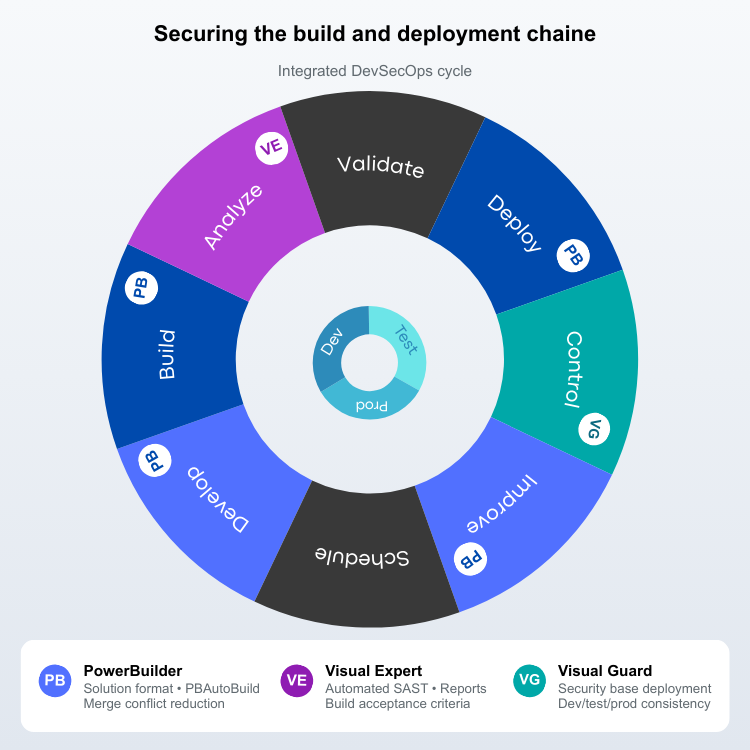
The recommended response combines integrity controls (signature, hash, SBOM), reduction of technical account privileges, and secret governance (rotation, leak detection, revocation) aligned with DevOps processes.
A secure build pipeline must not only sign artifacts, but also apply and verify executable hardening settings and DLL loading restrictions before release. Without this, secure coding and code signing may still leave local execution paths unnecessarily exposed.
Objectives
- Define a standard pipeline integrating build, testing, security analysis, signing, and deployment, with explicit pass criteria.
- Make builds reproducible by controlling tool versions, dependencies, and compilation parameters.
- Secure service accounts, secrets, and signing keys used by the pipeline, and limit their privileges.
- Retain artifacts and reports associated with each version to provide audit evidence and facilitate investigations.
- Standardize executable hardening settings across build pipelines and deployment targets.
- Verify executable security flags and DLL loading restrictions as part of release validation.
Features and Tools
| Switch to solution format to convert code to text and facilitate integration with versioning and automation tools. | PB |
| Use PBAutoBuild to simplify build scripts and standardize pipelines. | PB |
| Reduce merge conflicts and facilitate reviews and traceability with PB 2025. | PB |
| Configure executable hardening options and DLL loading restrictions at project level so they are consistently applied during build and release. | PB |
| Industrialize static vulnerability analysis (SAST) with every build: triggering, build acceptance criteria, and dashboard. | VE |
| Verify that no exception is ignored and that console logging is not used in production. Detect security vulnerabilities in PowerBuilder code | VE |
| Automate the deployment of access control settings (permissions, roles, etc.) between environments (dev/test/prod) to reduce discrepancies and errors. | VG |
Compliance
This chapter contributes to the governance and traceability expectations associated with ISO 27001 and, where applicable, internal control requirements (SOX). Security Standards & Compliance
Evidence
- Definition of the pipeline (build, tests, VE scan, signature, deployment) and artifact retention. PBAutoBuild integrates with PBC
- Release validation evidence confirming executable hardening flags, DLL loading restrictions, and signature verification settings.
- Build and deployment records showing consistent security settings across environments.
- History of Visual Expert reports by delivered version, with corrective action tracking. Detect security vulnerabilities in PowerBuilder code
- Visual Guard exports (audit/permissions) associated with versions and environments.
8. Strengthen Authentication and Access Control
- Password authentication offers limited security (weak passwords, shared accounts) and introduces risk, as identity has become a major attack vector: 22% of breaches studied in the 2025 DBIR began with the use of compromised credentials.
- This approach often involves managing user accounts specific to each application (siloed accounts) and increases administration costs.
- It also increases the risk of anomalies because administrators have more accounts to manage and monitor (inactive accounts, excessive privileges, no separation of duties, etc.).
The right strategy is to centralize user accounts in a single identity store—such as Active Directory or Entra ID—and add an extra layer of protection for sensitive applications with strong authentication (MFA).

Objectives
- Centralize user identities. Reduce the use of local application accounts, for example by replacing them with Windows accounts stored in Active Directory or MS EntraID.
- Deploy strong authentication (MFA) for sensitive applications and privileged accounts.
- Model rights through consistent roles and permissions, applying the principle of least privilege.
- Implement separation of duties for critical operations and handle authorization conflicts.
- Organize periodic reviews of rights and maintain audit evidence of sensitive logins and actions.
Features and Tools
| Integrate modern authentication and token mechanisms when the application interacts with identity services, using PB network objects HTTPClient/OAuth/RESTClient. | PB |
| Identify authentication/authorization implementations in code and detect authentication vulnerabilities in code. | VE |
| Implement MFA with Windows, login/password, or mixed mode. | VG |
| Manage identity federation and user group hierarchy. | VG |
| Identify conflicts through separation of duties (SoD). | VG |
| Produce audit-ready reports by generating a permission matrix. | VG |
Compliance
This chapter directly addresses the IAM and access governance requirements in ISO 27001, NIST SP 800-53, and PCI DSS, and is particularly relevant in the finance, healthcare, and publicly traded companies sectors. (Security Standards & Compliance)
Evidence
- Permission matrix by role/group/user and evidence of periodic reviews. (Permission Matrix)
- Documented SoD rules, list of detected conflicts, and remediation plan. (Separation of Duties (SoD))
- Audit logs of sensitive connections and operations, with retention and export. (Audit Activities)
9. Optional: Migrate to a Modern Architecture with PowerServer
Some PowerBuilder applications are now accessible remotely (VPN, application gateways, virtualization), while retaining a "thick client" that connects directly to the database and relies on parameters stored on client workstations.
This model introduces certain risks, as equipment located at the network perimeter and remote access points become critical entry points. It also becomes more difficult to control, workstation by workstation, the secrets and connection parameters.
The DBIR 2025 indicates that exploitation of vulnerabilities accounts for approximately 20% of initial accesses. It highlights that those affecting remote access equipment are particularly sensitive, as only 54% are corrected within 30 days.
The solution is to reduce workstation dependency and base exposure by moving to a multi-tier architecture, where an application server exposes .NET APIs (PowerServer), with centralized identity and controls placed in the right location (authentication, logs, network segmentation).
Objectives
- Reduce direct access to the database from client workstations by centralizing access in a server layer exposing APIs.
- Centralize server-side security controls (authentication, authorization, logging) to limit dependency on client applications and local configurations.
- Standardize API authentication and token management, aligning with the organization's practices.
- Plan for gradual evolution by prioritizing the most sensitive modules.
Features and Tools
| Use PowerServer to evolve toward a server-side n-tier architecture and reduce direct database access from client workstations. | PB |
| Implement authentication mechanisms such as OAuth 2.0 or JWT in Web APIs to prevent unauthorized access OAuth 2.0 or JWT in Web APIs. | PB |
| Update server components to a supported version of .Net | PB |
| Map the application, identify dependencies, and secure existing code before, during, and after an architecture change. | VE |
| Use standard tools to manage users, API access permissions, and generate audit reports. | VG |
| Centralize security for multiple applications to provide a comprehensive view of identities and rights, and standardize controls, logging, and audits. | VG |
Compliance
This chapter is part of an approach to align with auditable and standardized architectures, which is frequently emphasized in ISO 27001 and NIST. (Security Standards & Compliance)
Evidence
- Architecture diagram (network zones, Web APIs, reverse proxy, identity) and flow documentation. (PowerServer Web APIs)
- Evidence of access controls and audits (Visual Guard) on sensitive operations. (Traceability & Audit)
- Visual Expert reports certifying vulnerability fixes prior to production deployment. ( Detect security flaws in PowerBuilder code )
10. Bring Applications into Compliance with Modern Standards
In regulated sectors (finance, healthcare, listed companies), the goal is not only to strengthen security.
These organizations must demonstrate that their applications comply with modern standards. They must also carry out concrete and verifiable checks: who can access sensitive functions, what rights have been granted, what actions have been taken, and what measures protect critical data.
This requirement has been reinforced by transparency obligations: in the United States, for example, the SEC requires listed companies to report certain "material" cybersecurity incidents according to a highly regulated procedure.
Furthermore, the global average cost of a data breach reached $4.88 million in 2024, turning a compliance gap into a direct financial risk.
In this context, organizations must now systematize controls and produce evidence: reports, logs, access reviews, and change traceability.
To avoid duplication and facilitate audit preparation, this chapter links the features described above with compliance requirements.
Objectives
- Define the applicable standards and the expected scope of compliance for the application (internal and external requirements).
- Translate these requirements into measurable controls, then into evidence for audits.
- Establish a repository of evidence (reports, logs, access reviews, etc.).
- Formalize governance (access reviews, exception management, SoD conflict handling) and prepare a standardized audit file.
Features and Tools
| Support frequent requirements: code signing, DB/driver connection encryption, secure network protocols, and OAuth/REST integration capabilities. | PB |
| Provides repeatable and versioned analyses (particularly on PowerBuilder security rules), which are useful for demonstrating a vulnerability reduction and continuous improvement approach. | VE |
| Automate security checks and reports and compliance with modern standards: IAM, RBAC, separation of duties, traceability, auditing. | VG |
| Document "who has access to what" by publishing a permissions matrix. | VG |
| Rely on a repository of inspection rules to generate reproducible results for detecting vulnerabilities in source code. | VE |
Compliance
Visual Guard publishes a map of supported standards (ISO 27001, NIST SP 800-53, NIST SP 800-63, CIS Controls, PCI DSS, GDPR, etc.) and specifies the associated mechanisms (MFA, RBAC, SoD, logging, access review). (Security Standards & Compliance)
Evidence
- Correspondence matrix: control / requirement / functionality (PB, VE, VG) / evidence produced. (Security Standards & Compliance)
- Standard report sets: VE scans, permission matrix exports, audit logs, signature procedures. (Detecting security vulnerabilities in PowerBuilder code) (Permission Matrix) ( Using PowerBuilder code signing options )
- Governance process: frequency of access reviews, exception management, SoD conflict handling. (Separation of Duties (SoD))
Checklists for Securing a PowerBuilder Application
These checklists offer a pragmatic approach: actions applicable to most contexts, followed by optional actions to be activated depending on the organization's architecture and regulatory constraints.
Checklist A — Generic Measures (Recommended in most cases)
| Chapter | Measure |
|---|---|
Cross-cutting (prerequisites) |
Inventory applications, environments, dependencies, and flows (workstations, servers, databases, etc.). |
| Classify the data handled and formalize the associated protection requirements. | |
| Establish a remediation process (prioritization, target timelines, validation, tracking). | |
| Patch and keep exposed components up to date (OS, databases, middleware, libraries, remote access). | |
| Formalize an incident response plan and test DR/BCP (restore, recovery). | |
2. Executables and components |
Create a reproducible, versioned build process linked to an identifiable release. |
| Sign all executables, libraries and deployment packages using a company-approved certificate. | |
| Verify artifact integrity before distribution (hash/fingerprint) and record the result. | |
| Track deployed versions (hash, date, owner) and keep history. | |
| Restrict and audit publishing and administration rights related to deployment. | |
| Scan PowerBuilder code before release to identify vulnerabilities and bad practices. | |
| Detect and remove hard-coded secrets (IDs, passwords, keys, IPs) from code and scripts. | |
3. Protect data |
Identify sensitive data and where it resides (database, files, exports, logs, backups). |
| Enable TLS on the DB server and PB DB drivers to use TLS 1.2+, including certificate validation. | |
| Encrypt sensitive data at rest when required (database, files, exports, backups). | |
| Protect encryption keys (storage, access control, rotation, revocation). | |
| Encrypt connection properties. Generate encrypted connection strings (no clear-text secrets). | |
| Detect and eliminate weak ciphers (e.g., DES/3DES). Enforce robust modes. | |
| Detect and eliminate obsolete hashes (e.g., SHA-1/MD5) and enforce robust alternatives. | |
| Verify cryptographic strength (key sizes, operating mode, padding) against the security policy. | |
| Reduce exposure to sensitive data by tightly limiting access through roles/permissions. | |
| Enable supported executable hardening flags on the application executable. (DEP / ASLR / CFG / SafeSEH) | |
| Restrict DLL loading to approved paths and enable DLL signature verification where applicable. (Strict mode / DLL signature verification) | |
4. Network protocols |
Inventory network flows and the protocols actually negotiated (TLS versions, suites, certificates). |
| Remove obsolete protocols. Align TLS configuration with the company's policy. | |
| Certificate validation and error handling (no bypasses or silent downgrades). | |
| Implement mutual TLS authentication (mTLS) when required (internal/partner APIs). | |
| Test compatibility with proxies, gateways, and network protections (RESTClient / HTTPClient). | |
| Detect non-compliant or legacy network calls and prioritize their replacement. | |
5. Exchanges with external services and APIs |
Inventory integrations (APIs, internal services, SMTP) and the data exchanged. |
| Prefer REST over SOAP/INET for integrations (RESTClient). | |
| If SOAP is required, use HTTPClient with TLS 1.2+ and strong authentication. Avoid legacy SOAP client. | |
| Use token-based authentication rather than usernames and passwords, with HTTPClient / OAuthClient. | |
| Strictly limit privileges for tokens and technical accounts (scopes, permissions). | |
| Remove hard-coded secrets and organize storage, rotation and revocation (per environment). | |
| Detect and fix injection risks (SQL, OS commands, paths) on inputs and parameters. | |
| Validate inputs and encode outputs on exposed flows (services, APIs, files, emails). | |
| Trace sensitive operations (exports, sends, critical actions) plus monitoring/alerting. | |
6. Embedded browser |
Inventory screens embedding a browser and define expected content and allowed URLs. |
| Migrate to a modern, supported browser engine and remove obsolete components. | |
| Limit browsing, URL opening and script execution for untrusted content. | |
| Govern JavaScript interactions (application bridges) to prevent unwanted execution. | |
| Disable remote debugging in production and reserve it for controlled diagnostics. | |
| Restrict access to "web" screens. | |
| Monitor web access and trigger notifications on abnormal behavior (Traceability & Audit). | |
7. Build and deployment |
Define a standard pipeline (build, tests, analysis, signing, deployment) with explicit pass criteria. |
| Move to solution format to simplify versioning and automation (Solution). | |
| Move to PB 2025+ to reduce merge conflicts and improve traceability. | |
| Make builds reproducible (versions, dependencies, parameters). Retain artifacts and reports per version. | |
| Secure pipeline technical accounts (least privilege, separation of roles, audit). | |
| Secure pipeline secrets and keys (secure storage, restricted access, rotation). | |
| Industrialize SAST analysis on every build and block release if critical rules fail. | |
| Avoid risky practices in production (e.g., console logging) and do not ignore exceptions. | |
| Standardize deployment of security settings between dev/test/prod (avoid discrepancies). | |
| Verify executable hardening settings and DLL loading restrictions as part of build/release validation. (PESecurity / dumpbin / WinDbg) | |
8. Authentication and access control |
Centralize identity (AD/Entra ID) and reduce local application accounts. |
| Enable MFA for sensitive applications and privileged accounts. | |
| Model rights through roles and permissions aligned with least privilege. | |
| Centralize authentication, authorization and logging via a dedicated server (Identity Server). | |
| Implement separation of duties (SoD) for critical operations and address conflicts. | |
| Organize periodic access reviews and retain evidence. | |
| Produce an audit-ready permission matrix (who has access to what). | |
| Log sensitive logins and actions (who, what, when, where) and centralize monitoring. | |
10. Compliance with modern standards |
Define applicable standards and the application's compliance scope. |
| Translate requirements into measurable controls and expected evidence (reports, logs, access reviews). | |
| Establish an evidence repository and retain history per version/environment. | |
| Standardize governance (access reviews, exception management, handling SoD conflicts). | |
| Build a reusable audit pack linking requirements, controls, tools and evidence. |
Checklist B — Optional Measures (Architecture-Dependent)
| Chapter | Measure |
|---|---|
2. Executables and components |
If using PB 2025 R2 beta, evaluate advanced executable security flags on compatible project types before broader rollout. (DEP / ASLR / CFG / SafeSEH) | 5. Exchanges with external services and APIs |
If the application consumes APIs: strong authentication and rotation of keys/tokens (OAuth 2.0) |
| If the application consumes APIs: limit token scopes and privileges (OAuthClient) | |
| If emails: use native email support and modern authentication (SMTP Client / XOAUTH2). | |
| If emails: secure relays (auth, TLS), limit attachments, trace sensitive sends (XOAUTH2) | |
6. Embedded browser |
If Web/HTML components: control content, limit untrusted scripts (WebBrowser) |
| If Web/HTML components: replace legacy engines with a supported engine (WebView2) | |
| If executable hardening is enabled, verify post-build security flags with dedicated inspection tools before production release. (PESecurity / dumpbin / WinDbg) | |
7. Build and deployment |
If industrialization: standardize build scripts and pipeline orchestration (PBAutoBuild) |
| If stronger QA: build acceptance criteria based on analysis results (SAST) | |
8. Authentication and access control |
If authorization conflicts: define SoD rules and remediation (Separation of Duties (SoD)) |
| If complex organization: a user-group hierarchy mirroring the organization to delegate rights. | |
| If identities are spread across multiple directories: implement identity federation. | |
| If the organization prepares audits: generate and use a permissions matrix (Permission Matrix) | |
9. Modern architecture with PowerServer |
If the database is accessible from clients: migrate to an n-tier architecture with PowerServer |
| If the application exposes/consumes APIs: standardize API authentication (OAuth 2.0) | |
| If the application exposes/consumes APIs: use standard tokens, limit unauthorized access (JWT) | |
| Centralize server-side controls (authentication, authorization, logging). | |
| Plan a progressive evolution by prioritizing the most sensitive modules (Progressive migration). | |
| Update server components to a supported .NET version (.NET). | |
| Administer API access permissions and produce audit reports (Permissions / Audit Activities). | |
10. Compliance with modern standards |
If strong requirements (finance, healthcare, etc.): compliance governance and formal controls (Audit Activities) |
| If strong requirements: industrialize audit evidence and its retention (Permission Matrix) |
Frequently Asked Questions
Tools & Resources
PB PowerBuilder
VE Visual Expert
Bibliography – sources cited in this guide
- The 3CX incident in 2023 — CISA (DHS)
- 133 malicious Windows drivers — Sophos; Author: Andrew Brandt
- Security - What's New — Appeon
- Detecting security vulnerabilities in PowerBuilder code — Novalys (Visual Expert)
- Permissions — Novalys (Visual Guard)
- Security Standards & Compliance — Novalys (Visual Guard)
- Audit Activities — Novalys (Visual Guard)
- Verizon 2025 DBIR – Executive Summary — Verizon; Author: Verizon
- CISA – Ransomware Guide — CISA (DHS)
- The MD Anderson Case — U.S. HHS
- Secure Connection Encryptor - What's New — Appeon
- Supports Strict encryption for SQL Server - What's New — Appeon
- Permission Matrix — Novalys (Visual Guard)
- NIST SP 800-52r2 — NIST; Author: Kerry A. McKay; David A. Cooper
- PCI DSS — PCI SSC
- Supports HTTP/2 - What's New — Appeon
- PowerBuilder 2022 - What's New — Appeon
- Supports two-way TLS authentication - What's New — Appeon
- How to use Identity Server API? — Novalys (Visual Guard)
- Lack of object-level access controls — OWASP
- FBI IC3 2024 — FBI / IC3; Author: FBI Internet Crime Complaint Center (IC3)
- The Optus incident (2022) — Reuters; Author: Reuters
- Native email support (SMTP Client) - What's New — Appeon
- Enhanced RESTClient object - What's New — Appeon
- Traceability & Audit — Novalys (Visual Guard)
- Using Edge in IE mode — Microsoft
- Microsoft documentation — Microsoft
- CVE-2021-40444 — CISA (DHS); Author: CISA
- WebBrowser engine upgrade - What's New — Appeon
- WebBrowser enhancements - What's New — Appeon
- Supporting remote debugging in WebBrowser - What's New — Appeon
- The SolarWinds Incident — CISA (DHS)
- Ultra-fast compiler and new solution format - What's New — Appeon
- DBIR 2025 — Verizon
- Separation of Duties (SoD) — Novalys (Visual Guard)
- PowerServer Web APIs — Appeon
- Architecture - PowerServer Help — Appeon
- Reporting "material" cybersecurity incidents — U.S. SEC; Author: Erik Gerding
- Global average cost of a data breach reaches $4.88 million — www.ibm.com